If you saw my previous blog, you may be wondering, “how can I start making microtonal music?” While it can seem complex at first, I assure you, it will get easier with practice.
Scale Workshop
In my opinion, the BEST tool for experimenting with different tunings has got to be Sevish’s scale workshop, and it can be used right in your web browser with no external tools!
If you head to Scale Workshop, you’ll see that it has a number of strangely named tabs at the top, but don’t panic. The only ones you need for now are Build Scale and Virtual Keyboard.
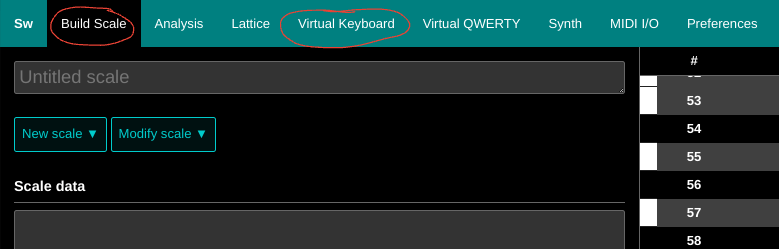
Build Scale does exactly what it sounds like. It lets you tell Scale Workshop what notes you want to use. An easy scale to for beginners is seven equal divisions of the octave (7EDO) so we’ll start with that. 7EDO can be thought of as taking a normal piano, removing all the black keys, and retuning it so that every key is an equal difference apart.
You can enter your scale in two ways. First, you can press New scale, enter 7 in the Number of divisions box, and press Ok. Alternatively, you can enter the scale manually by pasting
1\7
2\7
3\7
4\7
5\7
6\7
7\7
into the Scale data box. Finally, press Auto in the Key colors section near the bottom to make the black and white keys repeat in a way that is easy to understand.
Once you have done that, head over to the Virtual Keyboard. Here you will see a grid of black and white rectangles. As you might expect, clicking on a key plays a note. going right or left changes the pitch by 1 note, while going up and down changes it by 5.
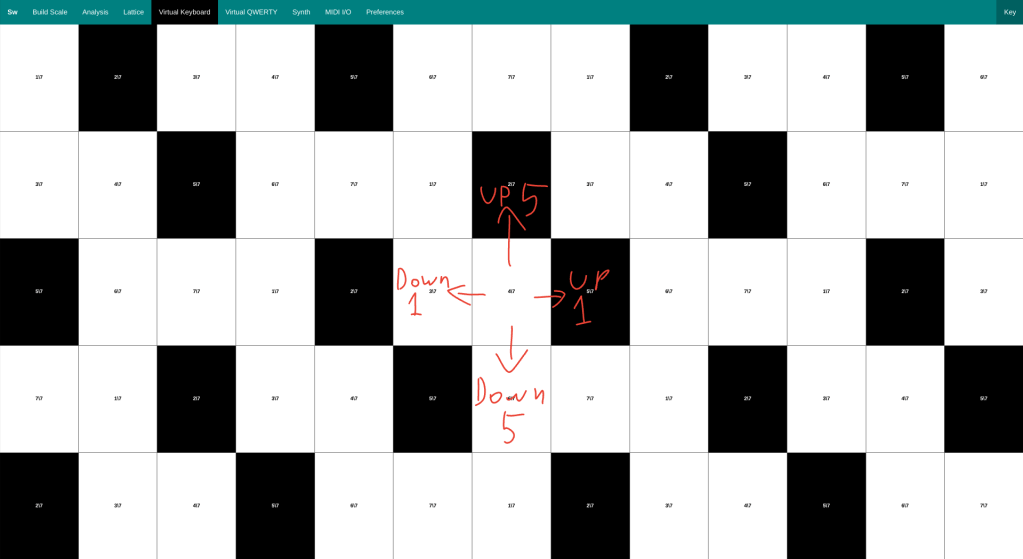
You can also play with your computer keyboard, as it works the same as the virtual one. Since there are less notes than on a normal keyboard, the theory is pretty simple and the best way to learn it is by experimentation.
Also try playing around with the left side of the Synth tab to use different instruments.
MIDI Keyboards
If you own a MIDI keyboard, (I have no idea how common they are. I have had at least one for almost my entire life.) you may want to play with that instead of the virtual one. If so, you’ll be glad to hear that Scale Workshop supports this too!
First, plug your keyboard into your PC. (it may not work on Mac and mobile. I’m mot really sure, but it definitely works on Windows and Chromebook.) At some point in the process, your browser might ask you to allow the site to take control of MIDI devices. If it does, make sure you click allow.
Next, in Scale Workshop, head to the MIDI I/O tab. This is where you can change how it interacts with MIDI devices. In the Input Device menu select your keyboard. Sound should now play from your speakers when you press keys on your keyboard. If the keyboard is also playing sound, turn the volume all the way down.
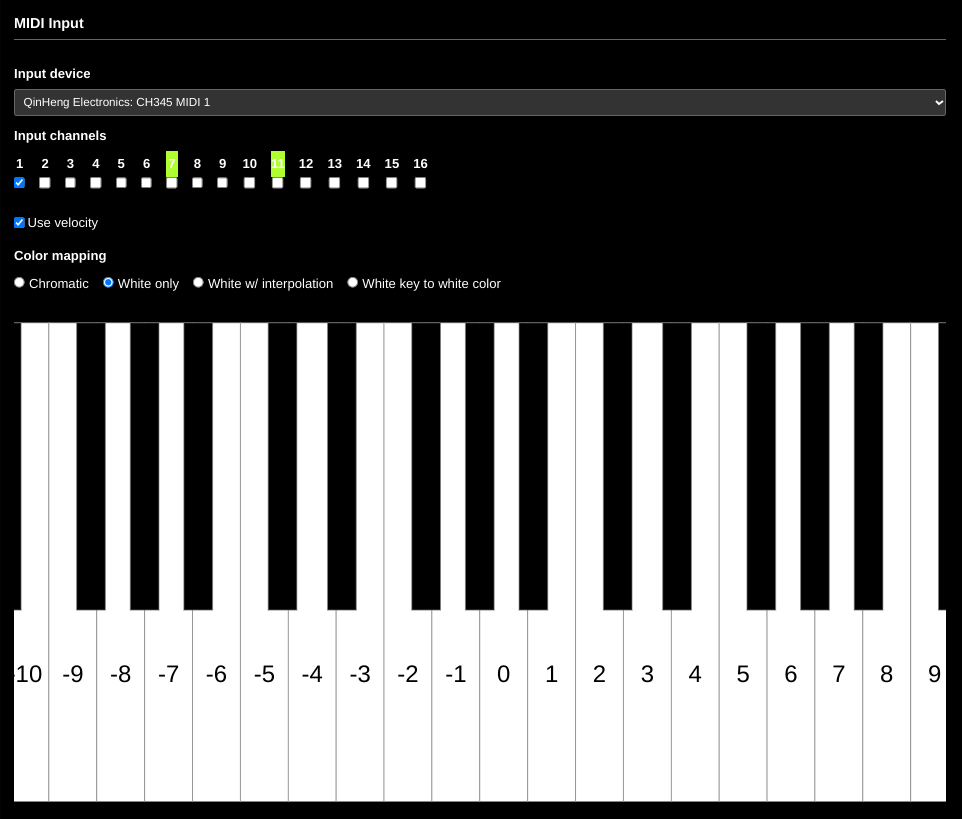
Finally, you must choose your mapping. For 7EDO, White only is the best choice, since that means it will ignore all black keys, which is essentially what that tuning is.
Live Instruments.
As many instruments are not restricted to specific notes, (violin, trombone, theremin, ect.) they are perfect for microtonal scales. I have never played any of these, but I think the best way to go about it would be to listen to the scale you want to use, and practice playing that scale until you have memorized the notes.
You may also have to retune the strings if you’re using a stringed instrument, but doing it by ear from scale workshop shouldn’t be too hard. Additionally, you can use tape to mark where the notes are, the same way you might have done when first learning your instrument.
Recording
If you are using live instruments, you’re in luck. You can just record the same way you would record anything else. With MIDI it is a bit harder.
Please note that this section gets very technical, and you might want to skip it if you don’t know much about music making.
Most DAWs don’t have the option to change your tuning, but I have found one synth that does. That synth is Surge XT. In the menu for Surge, there is a button labeled Tuning. right clicking this button will reveal a menu with a button labeled Change tuning. This will bring up a window with two sections, tuning and mapping.
The tuning menu is in a format used by the program Scala. If you are just using equal temperaments, you shouldn’t have to worry about it, as there is a menu at the bottom where you can make any equal scale you want. Ill leave you to figure out the rest, as I am by no means an expert, and only figured this out a few days ago.
Conclusion
People often stay away from microtonal music, because they don’t know where to start, and while it can be harder to work with than traditional music, it is not impossible. There are many good tools made by people like us (with a bit more technical know-how), who just want a way to make new and creative melodies.
One last thing:
By selecting your keyboard as the output device in Scale Workshop you can send retuned MIDI data back to the keyboard, and use your it’s synth instead of your computer’s, which will most likely sound better.
There is a newer version of the Scale Workshop website (Scale Workshop 3) available, but it is more complicated, so I chose to include the original instead.
Scala is an app that has many more options than Scale Workshop, but it is less intuitive and needs to be installed.
I am planning to add more images such as screenshots of Surge XT later, but I wanted to get this blog out ASAP since I was behind schedule.
Useful Links:
Scale Workshop – sevish.com/scaleworkshop
Surge XT – surge-synthesizer.github.io
Scale Workshop 3 –scaleworkshop.plainsound.org
Scala – huygens-fokker.org/scala
Xenharmonic Wiki – en.xen.wiki
Scale Workshop tutorial – youtu.be/U_yY5vwmk0I

 The Golden Thread
Leave a comment